Saturday, March 08, 2008

Tuesday, February 19, 2008
Friday, December 21, 2007
Windows Vista Help: Optimize Windows Vista for better performance

My Geeks are always talking about computers while I am trying to sleep.
I have picked up a lot of information that might be useful. So I am starting to post some of that stuff on my blog.
Who says an old dog can't learn new tricks?
Windows Vista Help: Optimize Windows Vista for better performance
I have picked up a lot of information that might be useful. So I am starting to post some of that stuff on my blog.
Who says an old dog can't learn new tricks?
Windows Vista Help: Optimize Windows Vista for better performance
Sunday, December 02, 2007


Sunday, October 28, 2007
Monday, September 17, 2007
Saturday, February 24, 2007
We're going shopping
I LOVE going shopping.
My favorite store is Petsmart. They let me in so I can sniff all the good smells.
Tuesday, January 02, 2007
A New Year
And it's time to decide what I'm going to do with the old blog. Keep it on jimandchris.com with the FTP option, or switch over to blogspot.com so I can use the new templates.
In either case, I'm hosting the photos at jimandchris.com, so that's what I'm testing here.


Monday, November 27, 2006
And Mother

Mother's watching too. So you be a good little doggie y'hear?
We don't want to have to do any censoring now do we?
Got my eye on you
Just so you know, I'm watching this experiment.
Not many dogs have their own blog.
You are representing canines around the world.
Poodles Rule!
Sunday, November 26, 2006
More Testing
Greg started his blog yesterday and he's having some issues with uploading photos. They upload fine the first time, then if he Edits that same post and uploads some more photos, the first set disappear. I'm going to go back to a previous post - with photos- here and try uploading some more and see what happens.
Worked ok for me. See post called Add Photos. I uploaded 5 more photos all at once. All the original photos are still there.
Thursday, November 23, 2006
Adding Photos



I get all messed up on how to use Add Image. I mean, Uploading the file I understand ... it's all those options of left, right, center or none and the small medium and large. So, I'm going to try all of them while Chris steps me through it and maybe we can both learn at the same time. I'm writing this paragraph first, then I'll go get a picture.
So, I chose small and left for the picture of me and it automatically went to the left of the current paragraph. So far, so good.
 Now, I'm writing another paragraph and I'm going to go get a different picture. I'm using the 'small' size for all of them so I don't have to type so much text to see the flow around them. The next picture will be of a road scene. I'll still keep it small, but I'll choose 'right' this time. Hmmm - it still appears at the top of my post, now to the right of the first paragraph. I have to drag it into place. And, here's the counter-intuitive part: Chris tells me to grab the picture and drag to the beginning of the paragraph. That's the left of the paragraph, not the right. But, when I let go, the picture appears at the right. She says that's the 'float' code that makes that happen. She says you can actually go into the 'Edit Html' view and see where it says "FLOAT: right", if you change 'right' to 'left', it will change the position of the picture. I don't like going into the html view, it scares me.
 OK, now it's time for a centered one. Geez, all this typing is making my paws ache. I'm usually a dog of few words, but we need words here to see the effect of the picture options.
  Now - the last one is 'none'. I have no idea where that's going to go, but I know how I'm going to do it. I'm going to upload it and it will appear at the top of this post. Then I'll drag it little by little till I get to the beginning of this paragraph - just before the 'Now'. Ok, here goes.
 Wednesday, November 22, 2006
Blogger 'Add Image' left, right, center, none

I get all messed up on how to use Add Image. I mean, Uploading the file I understand ... it's all those options of left, right, center or none and the small medium and large. So, I'm going to try all of them while Chris steps me through it and maybe we can both learn at the same time. I'm writing this paragraph first, then I'll go get a picture.
So, I chose small and left for the picture of me and it automatically went to the left of the current paragraph. So far, so good.
 Now, I'm writing another paragraph and I'm going to go get a different picture. I'm using the 'small' size for all of them so I don't have to type so much text to see the flow around them. The next picture will be of a road scene. I'll still keep it small, but I'll choose 'right' this time. Hmmm - it still appears at the top of my post, now to the right of the first paragraph. I have to drag it into place. And, here's the counter-intuitive part: Chris tells me to grab the picture and drag to the beginning of the paragraph. That's the left of the paragraph, not the right. But, when I let go, the picture appears at the right. She says that's the 'float' code that makes that happen. She says you can actually go into the 'Edit Html' view and see where it says "FLOAT: right", if you change 'right' to 'left', it will change the position of the picture. I don't like going into the html view, it scares me.
 OK, now it's time for a centered one. Geez, all this typing is making my paws ache. I'm usually a dog of few words, but we need words here to see the effect of the picture options. Did you know it's cold here in South Florida today? We woke up to 44 degrees. But I get warmed up when we go for a walk. We walk on the nature trail and, if I promise to stay on the trail Chris and Jim will let me off the leash and I can RUN. I love to RUN. Hmmm - maybe that's the picture I'll use for 'center' I'll find one of me running. Whew! That was kinda painful. It still brought the picture in to the top of this post and I can't see the top and the bottom here on the same screen so I couldn't drag the picture down. I had to drag it in sections. I still dragged it to the beginning of this paragraph - right before the 'OK'. When I let go, it appeared in it's current location. Chris says if you're real careful you can drag it from the top all the way to where you want it in one step - the screen will scroll as you drag down. I prefer doing it in sections.
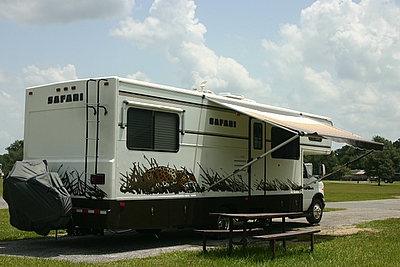
 Now - the last one is 'none'. I have no idea where that's going to go, but I know how I'm going to do it. I'm going to upload it and it will appear at the top of this post. Then I'll drag it little by little till I get to the beginning of this paragraph - just before the 'Now'. Ok, here goes. I'm using a picture of my home (motorhome) for this one. Oh, I see - 'none' means the picture shows up exactly where you drag it to. It's no different from text. If I drag it to the right, after the word 'go' - that's where it will show up, but the text won't wrap around it, I guess you need that 'float' for that.
That's all for now - I need a nap.
Sunday, November 19, 2006
Running
 I love to run. Here I am on the nature trail. I actually flew right by Chris, I'm surprised she was able to get a picture of me!
Saturday, November 18, 2006


Friday, November 17, 2006
Tuesday, November 14, 2006
Beach

Dania Beach on Sunday. We went to a Kayuba dive and picnic. Jim and Chris went that is, I (Odie) had to stay home. :-(
Beach renourishment will be a continual struggle.
Pretty morning.
Monday, November 13, 2006


Blogger Beta
This blog has just been converted to the new Blogger. It works best if published on blogspot.com I'd still like to host my photos on my own server.
Subscribe to:
Posts (Atom)